
How to Create Better Visual Hierarchy in Design on Squarespace
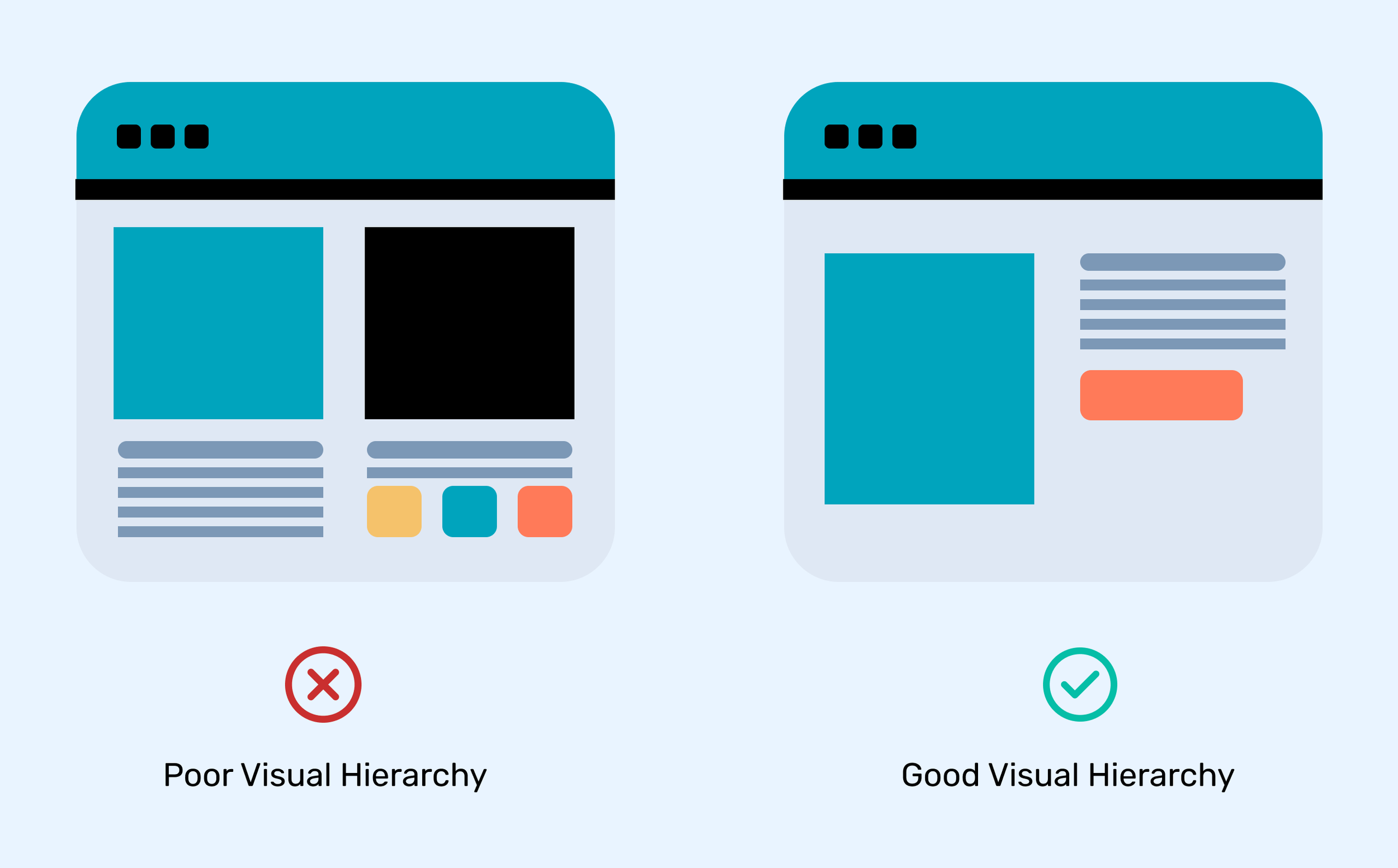
A website visitor decides where to look before they decide what to read. Within a few seconds, people scan the page, notice the strongest elements, and decide whether the website feels clear or confusing.
Many Squarespace websites look visually attractive but still fail to guide visitors toward important actions. The problem is often not the colors, images, or layout. The problem is that everything looks equally important.
A headline competes with a button. A service section competes with a small paragraph. Important information gets buried because the design does not tell visitors where to look first.
This is where visual hierarchy in design becomes important.
Visual hierarchy helps organize content based on importance. It creates a clear path for users to follow. A strong hierarchy tells visitors:
What should they notice first?
What information should they read next?
Where should they click?
Which message matters most?
For Squarespace websites, good hierarchy can improve readability, user experience, engagement, and conversions. Whether you are building a portfolio, business website, online store, or service-based website, the way information is arranged affects how visitors interact with your brand.
A well-designed website does not force users to search for answers. It guides them naturally.
At Pocketknife, we focus on creating websites where design choices support business goals. A visually organized Squarespace website helps visitors understand your message faster and creates a better experience across desktop and mobile devices.
For businesses investing in Colorado Squarespace website design, visual hierarchy is especially important because local customers often compare multiple businesses before making a decision. A website that communicates clearly can help build trust and encourage visitors to take action.
This guide explains how to create better visual hierarchy in Squarespace design, including the principles behind hierarchy, practical techniques, common mistakes, and ways to improve your website layout.
What Is Visual Hierarchy in Design?
Define Visual Hierarchy: Understanding the Basic Concept
To define visual hierarchy, it is the method of arranging design elements according to their level of importance. It helps users understand the order in which they should view and process information.
A design without hierarchy feels disorganized because every element competes for attention. A design with strong hierarchy creates structure and guides the viewer through the content.
The simplest visual hierarchy definition is:
Visual hierarchy is a design principle that controls how people notice, understand, and interact with visual information by arranging elements based on importance.
Designers use different visual techniques to create hierarchy, such as:
Size
Color
Contrast
Spacing
Position
Typography
Images
Shapes
Alignment
Each technique changes how quickly users notice an element.
For example:
A large website headline placed at the top of a page will usually receive attention before a smaller paragraph below it. A bright button surrounded by empty space will attract more attention than a simple text link.
The design is not only showing information. It is creating a visual order.
Why Visual Hierarchy Matters in Website Design
Squarespace gives users powerful design tools, but having access to templates and styling options does not automatically create a successful website.
Many websites struggle because they focus heavily on appearance but ignore content organization.
A visitor does not experience a website like a designer. They do not analyze every font choice or spacing decision. They quickly scan the page and search for answers.
They want to know:
Who is this business?
What does it offer?
Why should I trust it?
What action should I take?
A strong hierarchy answers these questions quickly.
Better User Experience
A website with clear hierarchy reduces confusion.
Visitors can easily move from one section to another because the design creates a natural reading path.
For example:
A service website homepage may follow this order:
Main message
Supporting explanation
Services
Benefits
Customer proof
Contact option
This structure works because the visitor receives information step by step.
Without hierarchy, users may see:
Multiple large headings
Too many colors
Equal-sized sections
Random spacing
Competing buttons
This creates decision fatigue.
Higher Engagement
Good hierarchy encourages visitors to continue exploring.
When important content is easy to find, users are more likely to:
Read more pages
Explore services
View products
Contact the business
Complete forms
A Squarespace website should not only look professional. It should help users complete their goals.
Stronger Brand Communication
Design hierarchy also affects brand perception.
A luxury brand may use:
Large whitespace
Elegant typography
Minimal elements
A creative agency may use:
Bold visuals
Strong contrast
Dynamic layouts
A local service business may focus on:
Clear headlines
Trust signals
Easy navigation
The hierarchy should match the message a brand wants to communicate.
The Main Principles of Graphic Design Visual Hierarchy
Understanding graphic design visual hierarchy helps designers create layouts that feel organized and intentional.
Below are the main principles that influence how users view a design.
1. Size Creates Importance
One of the strongest hierarchy tools is size.
Larger elements naturally attract attention first. Designers often use size to show importance.
Examples:
Homepage headline larger than supporting text
Main service larger than secondary information
Primary button larger than supporting links
On Squarespace, adjusting heading sizes can immediately improve page structure.
A common mistake is making every heading large because the designer wants each section to stand out.
The result?
Nothing stands out.
A good hierarchy uses size carefully.
Example:
Weak structure:
Our Services
Why Choose Us
Our Process
Contact Us
All headings have the same visual weight.
2. Typography Builds Reading Flow
Typography is one of the most important parts of visual hierarchy web design.
Fonts communicate structure before people read the words.
A website usually needs different text levels:
Primary Heading
Used for the main message.
Example:
"Professional Squarespace Website Design for Growing Businesses"
Secondary Heading
Used for important sections.
Example:
"Why Choose a Squarespace Website?"
Body Text
Used for explanations and details.
A clear type system helps visitors scan content quickly.
Good typography practices include:
Using consistent heading sizes
Keeping paragraphs readable
Avoiding too many font styles
Creating enough space between text sections
Maintaining strong contrast
3. Color Directs Attention
Color can guide visitors toward important areas.
A website does not need many colors. It needs purposeful color choices.
For example:
A brand may use:
Neutral colors for backgrounds
Dark text for information
One strong accent color for buttons
This creates focus.
If every element uses bright colors, visitors do not know where to look.
In Squarespace design, color hierarchy can be used for:
Call-to-action buttons
Important announcements
Service highlights
Navigation elements
The goal is not decoration.
The goal is direction.
4. White Space Improves Clarity
White space, also called negative space, is the empty area around design elements.
Many beginners think empty space means wasted space.
The opposite is true.
White space gives content room to breathe.
It helps:
Separate sections
Highlight important information
Improve readability
Create a cleaner appearance
A crowded website forces users to process too much information at once.
A balanced layout feels easier to understand.
5. Placement Controls Attention
Where an element appears affects how important it feels.
People usually scan websites from:
Top to bottom
Left to right
Large areas to small details
Important information should usually appear:
Near the top of the page
In clear sections
Before less important details
For example, a business homepage should not hide its main service explanation at the bottom of the page.
Visitors should understand the offer early.
6. Contrast Creates Visual Focus
Contrast helps elements stand apart.
Designers create contrast through:
Light and dark colors
Different font sizes
Different shapes
Image versus text
Bold versus regular text
A button should look different from normal text.
A headline should look different from body content.
Without contrast, everything blends together.
7. Create a Clear Visual Path Through Your Website
A strong website layout works like a guided journey. Visitors should naturally move from one important point to another.
A common mistake is creating pages where every section tries to be the main attraction.
For example, a business homepage may include:
A large hero image
Multiple bold headings
Several buttons
Many service cards
Long paragraphs
Different colors
Even though each section may look good individually, the overall page becomes difficult to follow.
Good hierarchy creates a visual path.
A typical Squarespace homepage structure may include:
First Level: Main Message
This is the first thing visitors see.
It should communicate:
Who you are
What you offer
Who you help
Example:
"Custom Squarespace Website Design for Colorado Businesses"
Second Level: Supporting Information
This explains why visitors should continue reading.
Examples:
Benefits
Features
Process
Experience
Third Level: Action Areas
These guide visitors toward the next step.
Examples:
Request a consultation
View services
Contact the team
Each level has a different purpose.
8. Use the F-Pattern and Z-Pattern Layouts
Understanding user reading patterns helps improve visual hierarchy web design.
Most visitors do not read every word on a website. They scan.
Two common scanning patterns are the F-pattern and Z-pattern.
F-Pattern Layout
The F-pattern is common on text-heavy pages.
Visitors usually:
Read the top section horizontally
Scan downward
Look for important points
This works well for:
Blog posts
Service pages
Educational content
To improve an F-pattern layout:
Use descriptive headings
Break long sections into smaller parts
Highlight important information
Use bullet points
Z-Pattern Layout
The Z-pattern is common on landing pages and simple websites.
Visitors often move:
Across the top
Down diagonally
Across the bottom
This layout works well for:
Homepage designs
Landing pages
Portfolio websites
A Squarespace homepage often benefits from this structure because it creates a simple visual journey.
9. Build Strong Hero Sections
The hero section is usually the first visual area visitors see.
A weak hero section creates confusion.
A strong hero section immediately communicates value.
A good Squarespace hero section includes:
Clear Headline
The headline should explain the main offer.
Example:
"Colorado Squarespace Website Design That Helps Businesses Stand Out Online"
Supporting Description
The description provides context.
Example:
"We create professional Squarespace websites designed for better user experience, clear messaging, and stronger online visibility."
Focused Action
The visitor should understand the next step.
Examples:
Schedule a consultation
Explore services
Start a project
Avoid adding multiple competing actions.
Too many buttons weaken hierarchy.
10. Create Content Groups With Visual Organization
Grouping related information helps users understand connections.
This principle is based on proximity.
When related elements are placed close together, users understand they belong together.
For example:
A service card may include:
Service name
Short description
Related image
Button
These elements should stay visually connected.
Poor organization:
Service title at the top
Description far below
Button somewhere else
Better organization:
Service title
Description
Button
The user immediately understands the relationship.
11. Use Images With Purpose
Images are powerful hierarchy tools.
However, adding images without strategy can weaken a design.
A good image should support the message.
Examples:
A restaurant website may use:
Food photography
Interior images
Customer experience photos
A professional service website may use:
Team photos
Workplace images
Project examples
The image should help visitors understand the brand.
Avoid using large images that push important information too far down the page.
12. Create Balance Between Text and Visual Elements
A website needs balance.
Too much text creates difficulty.
Too many visuals create a lack of information.
A strong design combines:
Clear headlines
Short paragraphs
Supporting visuals
Helpful sections
This is especially important for businesses using Squarespace because many templates rely heavily on visual presentation.
A professional website should look attractive while still communicating clearly.
Improving Mobile Visual Hierarchy in Squarespace
Mobile visitors experience websites differently.
A layout that works on desktop may not work well on smaller screens.
Mobile design requires careful attention to:
Text size
Section spacing
Image placement
Button size
Content order
Why Mobile Hierarchy Matters
Most visitors access websites through smartphones.
If important information is difficult to find on mobile, users may leave quickly.
A good mobile hierarchy should:
Place the main message first
Keep headings readable
Avoid oversized sections
Make buttons easy to tap
Reduce unnecessary scrolling
Mobile Typography Guidelines
Large desktop headings may become overwhelming on mobile.
Instead:
Reduce heading size
Maintain clear differences between heading levels
Keep body text comfortable to read
Example:
Desktop:
Main heading: 60px
Mobile:
Main heading: 36px
The goal is consistency, not identical sizing.
Mobile Button Placement
Buttons should appear where users naturally expect them.
Good placements include:
After explaining a service
After introducing a benefit
At the end of a section
Avoid placing important actions only in the navigation menu.
How Pocketknife Uses Visual Hierarchy for Better Squarespace Websites
At Pocketknife, we understand that website design is not only about appearance. A website needs structure, clarity, and purpose.
A strong website design combines:
Clear messaging
Organized layouts
Strategic typography
Balanced spacing
User-focused navigation
For businesses looking for Colorado Squarespace website design, visual hierarchy can make the difference between a website that simply exists and one that communicates effectively.
A professional Squarespace website should help visitors quickly understand:
What your business provides
Why they should choose you
How they can contact you
Every design choice should support these goals.
Common Visual Hierarchy Mistakes in Squarespace Design
Even professional-looking websites can have hierarchy problems.
Below are common mistakes that reduce website effectiveness.
1. Making Every Element Important
When everything is highlighted, nothing stands out.
Common examples:
Multiple large headings
Too many bold sections
Several bright buttons
Excessive animations
Solution:
Create clear priority levels.
Ask:
"What is the one thing visitors should notice first?"
2. Using Too Many Fonts
Different fonts can create visual confusion.
A website usually needs:
One heading font
One body font
Optional accent style
Too many fonts make the design feel inconsistent.
3. Ignoring Spacing
Spacing is one of the easiest ways to improve hierarchy.
Poor spacing creates:
Crowded sections
Difficult reading
Weak separation
Good spacing creates:
Better flow
Clear sections
Improved focus
4. Weak Heading Structure
Headings are not only decoration.
They organize information.
A proper heading structure helps both users and search engines understand the page.
Example:
H1:
Professional Squarespace Website Design Services
H2:
Our Website Design Process
H3:
Planning and Strategy
H3:
Design and Development
This creates a logical structure.
5. Designing Without User Goals
A website should not only represent the business.
It should help visitors.
Before designing a page, consider:
What information does the visitor need?
What problem are they trying to solve?
What action should they complete?
User goals should influence hierarchy.
Visual Hierarchy Checklist for Squarespace Websites
Use this checklist when reviewing your website design.
Headings
✓ Is the main message clear immediately?
✓ Are heading sizes organized?
✓ Are sections easy to scan?
Colors
✓ Are important actions easy to notice?
✓ Are colors consistent with branding?
Layout
✓ Does content flow naturally?
✓ Is there enough spacing?
Images
✓ Do visuals support the message?
✓ Are important sections visible without excessive scrolling?
Mobile
✓ Does the design work well on smaller screens?
✓ Are buttons easy to use?
The Connection Between Visual Hierarchy and Conversion Rates
Good design is not only about making a website attractive.
It affects user decisions.
When visitors understand a website quickly, they are more likely to:
Stay longer
Explore services
Trust the business
Contact the company
A confusing website creates hesitation.
A clear website creates confidence.
This is why businesses investing in professional Colorado Squarespace website design should consider hierarchy as a core part of their website strategy.
How to Improve Your Existing Squarespace Website’s Visual Hierarchy
You do not always need a complete redesign.
Small improvements can create major differences.
Start with these steps:
Step 1: Identify Your Main Goal
Every page should have one primary purpose.
Examples:
Generate inquiries
Sell products
Showcase work
Educate visitors
Step 2: Review Your First Screen
Look at the area visitors see before scrolling.
Ask:
Is the message clear?
Is the headline strong?
Is the next step obvious?
Step 3: Reduce Visual Competition
Remove unnecessary elements.
Consider:
Fewer colors
Less text
Cleaner spacing
Stronger headings
Step 4: Improve Content Structure
Break large blocks into:
Short paragraphs
Bullet points
Clear sections
This improves readability.
Step 5: Test the User Experience
Ask someone unfamiliar with your business to visit your website.
Ask them:
What do you think this business offers?
What did you notice first?
Was anything confusing?
Their feedback can reveal hierarchy problems.
Frequently Asked Questions
What is visual hierarchy in design?
Visual hierarchy in design is the process of arranging website and graphic elements according to their level of importance. It helps users understand what information they should notice first, what they should read next, and where they should take action. Designers create hierarchy by using size, color, contrast, spacing, typography, alignment, and positioning.
A strong visual hierarchy makes websites easier to navigate and improves the overall user experience.
Why is visual hierarchy important for Squarespace websites?
Visual hierarchy is important for Squarespace websites because it helps visitors quickly understand a brand’s message and services. A clear hierarchy guides users through the page, highlights important information, and reduces confusion.
Without proper hierarchy, visitors may struggle to find key details, which can increase frustration and reduce engagement. A well-organized Squarespace website creates a smoother experience and encourages users to explore further.
How do you create visual hierarchy in web design?
You can create visual hierarchy in web design by organizing elements based on importance. Common techniques include:
Using larger headings for important messages
Creating contrast with colors
Adding enough white space between sections
Using consistent typography
Highlighting primary buttons
Grouping related information together
Using images strategically
These techniques help users understand the structure of a webpage quickly.
What are the main principles of graphic design visual hierarchy?
The main principles of graphic design visual hierarchy include:
Size: Larger elements attract more attention.
Color: Strong colors can highlight important areas.
Contrast: Differences between elements create focus.
Spacing: Empty space improves clarity.
Alignment: Organized layouts create structure.
Typography: Font choices show content importance.
Position: Placement influences what users notice first.
Combining these principles creates a balanced and easy-to-follow design.
How does visual hierarchy improve user experience?
Visual hierarchy improves user experience by making websites easier to understand and navigate. When visitors can quickly identify important information, they spend less time searching and more time interacting with the website.
A clear hierarchy helps users:
Find answers faster
Understand services
Navigate pages easily
Complete desired actions
This creates a more comfortable browsing experience.
Conclusion:
A successful website is not only about having attractive colors, modern layouts, or high-quality images. The real goal of design is to make information easy to understand and help visitors move through the website naturally.
Visual hierarchy in design plays an important role in creating this experience. By using proper sizing, typography, spacing, contrast, alignment, and content organization, businesses can create Squarespace websites that communicate their message clearly.
A strong visual hierarchy helps visitors quickly understand:
What your business offers
Why your services matter
Where they should find important information
What action they should take next
Without hierarchy, even a visually appealing website can feel confusing. When every element competes for attention, visitors may struggle to find the information they need. A well-planned hierarchy creates balance and makes the browsing experience more comfortable.
