
Does URL Redirect Affect SEO

A single redirect can protect years of SEO work. A bad redirect setup can do the opposite.
That is why changing a URL should never be treated as a small website edit. Search engines may already know the old address, users may have bookmarked it, other websites may link to it, and Google may have collected signals around it for years. When that URL disappears without a proper replacement, those connections can break.
So, do redirects affect SEO? Yes. But redirects are not automatically harmful.
A correctly planned permanent redirect can help Google understand that a page has moved and that the new URL should replace the old one. Google specifically recommends permanent server-side redirects, such as 301 and 308 redirects, when a URL has moved permanently. Google also states that 301 and other permanent redirects do not cause a loss of PageRank.
Problems usually appear because of how redirects are implemented, not because redirects exist.
A page sent to an irrelevant destination, a chain containing several redirects, conflicting canonical tags, outdated internal links, or hundreds of old URLs pushed to the homepage can create serious SEO problems.
This guide explains the relationship between redirects and SEO, when redirects help, when they hurt, how an SEO 301 redirect should be used, and how to change a domain without losing SEO. We will also cover Squarespace migrations and when working with a Squarespace SEO expert may make sense.
What Is a URL Redirect?
A URL redirect automatically sends a visitor or search engine crawler from one URL to another.
For example:
example.com/old-service
may redirect to:
example.com/new-service
A person who visits the old address is automatically taken to the new one.
Search engines also receive information about the move. The type of redirect tells Google whether the move is expected to be permanent or temporary.
Google describes URL redirects as a way of telling both visitors and Google Search that content has moved to a different location.
Redirects are commonly needed when:
A page URL or slug changes.
A page is moved to another section.
Two similar pages are combined.
A website moves from HTTP to HTTPS.
A company changes its domain.
A website moves to a different CMS.
An old product is replaced.
A website redesign changes the URL structure.
Several versions of the same URL need one preferred destination.
Old campaign pages are replaced with permanent resources.
Redirects become an SEO issue when an existing URL already has search visibility, backlinks, traffic, or historical value.
Do Redirects Affect SEO?
Yes, redirects affect SEO, but the effect depends on the redirect type, destination, implementation, and surrounding website setup.
A proper redirect can preserve continuity between an old URL and its replacement. A poor redirect can confuse crawlers, waste crawl activity, send users to irrelevant pages, or cause valuable URLs to disappear from search results.
Google divides redirects mainly into permanent and temporary signals.
Permanent redirects tell Google that the new destination should generally replace the old URL as the canonical location.
Temporary redirects indicate that the original URL may return, so Google may continue treating the original page as the primary URL.
A redirect can influence several parts of SEO
Redirects may affect:
Which URL Google indexes.
Which URL appears in search results.
How signals associated with an old URL are consolidated.
How Googlebot discovers replacement pages.
How quickly a site migration is processed.
How efficiently users reach content.
Crawl paths across the website.
Internal link structure.
Backlink destinations.
Canonicalization.
Site migration performance.
The question should therefore not simply be:
"Are redirects bad for SEO?"
A better question is:
"Does this redirect send the old URL to the most appropriate replacement using the correct redirect type?"
That distinction matters.
How Redirects and SEO Work Together
To understand redirects SEO issues, consider what happens when Google already knows an existing page.
Suppose you have:
pocketknife.com/services/squarespace-design
The page ranks for several searches and has links from other websites.
You later change the page URL to:
pocketknife.com/squarespace-web-design
If the original page simply disappears, users clicking old links may reach a 404 page. Search engines must also figure out what happened to the old content.
A permanent redirect creates a clear connection:
/services/squarespace-design
301 →
/squarespace-web-design
Google can follow the redirect and process the new URL as the replacement.
For permanent moves, Google recommends permanent server-side redirects whenever possible.
Redirects help preserve URL continuity
A search engine does not view a website only as a collection of words and images. Individual URLs become known entities within its index.
A URL may have:
External links.
Internal links.
Search impressions.
Historical crawl data.
Relevance signals.
User traffic.
Canonical signals.
Changing that address without telling search engines where the content went breaks an important connection.
A redirect acts as that connection.
SEO 301 Redirect: What Does a 301 Mean?
A 301 redirect means that a resource has moved permanently.
The HTTP status code is:
301 Moved Permanently
For SEO purposes, it tells search engines that the old URL should no longer be treated as the permanent location and that another URL is now the intended destination.
Google recommends permanent server-side redirects when a URL has permanently changed. Both HTTP 301 and HTTP 308 status codes are treated as permanent redirects.
Example
Old:
example.com/seo-services
New:
example.com/search-engine-optimization
Redirect:
/seo-services → 301 → /search-engine-optimization
When Googlebot visits the old URL, it receives the redirect response and follows it to the new page.
Over time, Google can replace the old address with the new one in its index.
Are 301 Redirects Bad for SEO?
No. 301 redirects are not bad for SEO when they are used correctly.
This question often comes from old SEO advice claiming every redirect causes a fixed percentage of link authority to disappear.
Google's current migration documentation states that 301 and other permanent redirects do not cause a loss in PageRank.
That does not mean every 301 redirect is harmless.
The redirect itself may be correct while the overall migration is wrong.
For example:
Page A ranks for "commercial photography."
Page A is removed.
Page A redirects to a generic homepage.
The homepage contains almost nothing about commercial photography.
The problem is not that a 301 was used.
The problem is that the destination does not properly replace the original content.
Google specifically warns against redirecting many old URLs to one irrelevant destination, such as the homepage. Such redirects can confuse users and may be treated as soft 404s.
Do 301 Redirects Hurt SEO?
A properly implemented SEO 301 redirect should not hurt SEO simply because it exists.
However, a 301 can be part of an SEO problem when one of the following happens.
The new page is not equivalent to the old page
A redirect should usually lead to the closest useful replacement.
If an article about:
"How to Build a Squarespace Portfolio Website"
is removed, redirecting it to:
"Contact Us"
makes little sense.
A stronger destination might be:
"Squarespace Website Design Guide"
or another page covering the same need.
Too many redirects happen before the final page
Consider:
Page A → Page B → Page C → Page D
That is a redirect chain.
Google can follow multiple redirect hops, but it advises redirecting directly to the final destination where possible. Its site-move guidance says chains should ideally remain very short and notes that chains add latency for users.
Instead of:
A → B → C → D
update the rule to:
A → D
The redirect creates a loop
A redirect loop might look like:
Page A → Page B → Page A
Neither users nor crawlers reach the intended content.
This can make the page inaccessible and requires immediate correction.
Internal links still point to redirected URLs
Redirects should not become a substitute for maintaining internal links.
Suppose 500 internal links point to:
/old-page
and /old-page redirects to /new-page.
Those links may technically work, but every click or crawl takes an unnecessary extra step.
Google recommends updating internal links during site moves so that they point directly to new URLs.
The redirect is removed too soon
Another common mistake is removing migration redirects a few weeks after launch.
Google recommends keeping site-move redirects for as long as possible and generally for at least one year. This gives Google time to recrawl old URLs and process signals and links pointing to them. Google also suggests that keeping redirects indefinitely can make sense for users.
301 vs. 302 Redirect for SEO
Choosing between a 301 and 302 is important because they communicate different intentions.
301 redirect
Use a 301 when the change is permanent.
Common examples include:
Permanent page URL changes.
Domain migrations.
Permanent content consolidation.
Removing a page and replacing it with an equivalent resource.
Website restructures.
Permanent protocol or hostname changes.
302 redirect
A 302 means the move is temporary.
Google describes 302, 303, and 307 redirects as temporary redirects. Googlebot follows them, but the redirect itself is not treated as a signal that the destination should replace the source as the canonical URL.
Good reasons for a 302 may include:
Temporary maintenance.
Short-term campaign changes.
Temporary product availability.
A/B testing.
Seasonal page substitutions.
Temporary promotional experiences.
Google specifically recommends temporary redirects for temporary situations because this can help keep the original URL represented in search results.
Simple rule
Ask one question:
Will the old URL return?
If no, a permanent redirect is normally appropriate.
If yes, consider a temporary redirect.
What About 307 and 308 Redirects?
SEO discussions often focus on 301 and 302, but other HTTP redirect codes exist.
308 redirect
A 308 is a permanent redirect.
From Google's search perspective, 301 and 308 are both signals that a URL has permanently moved.
307 redirect
A 307 is temporary.
Google groups 302, 303, and 307 responses under temporary redirects.
For most website owners working inside WordPress, Squarespace, Shopify, or another CMS, 301 and 302 remain the most familiar options.
Server-Side Redirects vs. JavaScript Redirects
Not every redirect happens at the server level.
Redirects can also be created with:
Server configuration.
HTTP response headers.
CMS redirect tools.
Meta refresh tags.
JavaScript.
For SEO, Google recommends permanent server-side redirects whenever possible when content has permanently moved.
Why server-side redirects are preferred
The server can immediately tell both the browser and crawler that the requested resource has moved.
JavaScript requires the page to be processed before the redirect can occur.
Google can process JavaScript redirects, but its documentation advises using them only when server-side or suitable meta refresh methods cannot be used. Rendering may fail, meaning Google might not see the JavaScript redirect as reliably.
For an important migration, use the clearest technical signal available.
The Biggest Redirect SEO Mistakes
Redirect problems often come from small decisions repeated across hundreds or thousands of URLs.
Here are the issues worth checking first.
1. Redirecting everything to the homepage
This is one of the most damaging migration shortcuts.
A website with 800 old URLs should not automatically send all 800 to:
example.com/
Google warns that redirecting many old URLs to one irrelevant destination can be treated as a soft 404.
Each valuable URL should have a relevant destination.
2. Creating long redirect chains
Example:
Old URL → Old Redesign URL → HTTPS URL → New Domain URL → Final URL
The final page may work, but the path is needlessly long.
Redirect each old address directly to the current destination.
3. Forgetting backlinks
Some old pages may have strong external links.
When preparing a migration, identify:
Most-linked pages.
Most-visited landing pages.
Highest-converting pages.
Pages receiving referral traffic.
URLs used in press mentions.
URLs used in profiles and directories.
These URLs deserve careful mapping.
4. Leaving old URLs inside internal links
After launching redirects, crawl the website and update internal navigation, contextual links, image links, buttons, and footer links.
Google recommends changing internal links to the new addresses during URL migrations.
5. Forgetting canonical tags
A new page should normally reference its own current URL as the canonical address.
For example, if:
/old-service
redirects to:
/new-service
the canonical tag on /new-service should not still point back to /old-service.
Google advises checking canonical annotations after redirects are activated and making sure new pages use the new URLs.
6. Leaving old URLs in the new sitemap
Your new XML sitemap should list the URLs you want search engines to crawl and index.
Do not fill your main new sitemap with addresses that simply redirect somewhere else.
During a migration, Google recommends submitting the new sitemap so it can learn about the replacement URLs.
7. Redirecting deleted content without considering relevance
Not every deleted URL needs a redirect.
If there is no meaningful replacement, allowing the URL to return a proper 404 or 410 may be better than redirecting users to an unrelated page.
Redirects are most useful when a legitimate replacement exists.
When a Redirect for SEO Makes Sense
A redirect for SEO should serve both users and search engines.
Here are common situations where a permanent redirect is useful.
Changing a URL slug
Old:
/seo-company-london
New:
/seo-services-london
Use a permanent redirect if the old slug will not return.
Combining overlapping articles
Suppose you have:
/what-is-technical-seo
/technical-seo-guide
/technical-seo-basics
If the content overlaps heavily, you may combine the useful material into one stronger resource and redirect the retired URLs to it.
This works because the replacement page addresses the same topic.
Replacing discontinued products
If an old product has a clear newer version, redirecting users to the replacement can be helpful.
Do not redirect every discontinued product to a generic category without considering search intent.
Changing website structure
Old:
/services/web-design/squarespace
New:
/squarespace-design
The content remains available, but the location changes.
A 301 helps connect the addresses.
Switching from HTTP to HTTPS
A permanent redirect should send HTTP versions to HTTPS versions.
Google lists HTTP-to-HTTPS changes as a site move involving URL changes.
Changing domains
This is one of the most important use cases for redirects.
A domain migration may involve thousands of URLs and many years of SEO history.
It requires far more planning than pointing the old homepage at the new homepage.
How to Change Domain Without Losing SEO
Businesses rebrand, merge, change company names, or move to better domains all the time.
A domain change can be completed without throwing away years of search work, but nobody can promise absolutely zero ranking movement.
Google says significant site changes can produce temporary ranking fluctuations while its systems recrawl and reindex the new URLs. For a medium-sized site, processing most pages can take a few weeks, while larger websites may require longer.
The safest method is a controlled migration.
Step 1: Crawl and export the current URLs
Before touching the domain, create a list of existing URLs.
Include:
Pages.
Posts.
Products.
Categories.
Landing pages.
PDFs where relevant.
Images with search traffic where possible.
High-value legacy URLs.
Also collect information from analytics and Google Search Console.
Step 2: Identify valuable URLs
Mark pages with:
Organic traffic.
Rankings.
Backlinks.
Leads.
Sales.
Referral visits.
Strong engagement.
Brand importance.
Google recommends starting URL mapping with important URLs found through sitemaps, analytics, server logs, and Search Console link data.
Step 3: Build an old-to-new URL map
Create a spreadsheet with columns such as:
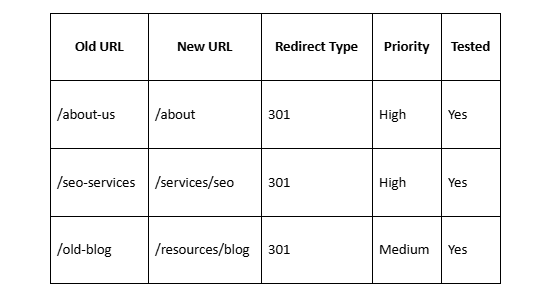
Every important old page should point to its closest replacement.
Google specifically recommends preparing an old-to-new URL mapping before starting a site move.
Step 4: Keep content changes under control
Changing a domain, CMS, design, copy, site structure, and brand positioning all at once makes problems harder to diagnose.
Google recommends changing one major thing at a time when practical.
If rankings fall, you need to know whether the problem came from:
Redirects.
New content.
Missing pages.
Internal links.
Rendering.
Canonicals.
Navigation.
Indexing restrictions.
Reducing simultaneous changes makes diagnosis easier.
Step 5: Add direct permanent redirects
The preferred setup is:
Old URL → 301 → Matching New URL
Avoid:
Old URL → Redirect 1 → Redirect 2 → Redirect 3 → New URL
Google recommends direct permanent server-side redirects and advises avoiding redirect chains.
Step 6: Update internal links
Menus, body links, footer links, buttons, breadcrumbs, and other internal references should point straight to new URLs.
Do not depend on redirects to fix your own links.
Step 7: Update canonical tags
Each new page should use the correct new canonical URL.
Also review:
Hreflang tags.
Structured data URLs.
Open Graph URLs.
Image references.
Pagination references where applicable.
Step 8: Submit the new sitemap
Generate a sitemap containing the new URLs and submit it through Google Search Console.
Google recommends this as part of processing a site migration.
Step 9: Use Search Console's Change of Address for domain moves
For a genuine move from one domain to another, Google recommends submitting a Change of Address request for the old site.
This is different from a basic URL slug change on the same domain.
Step 10: Keep redirects active
Do not remove the redirects once the new pages start ranking.
Google recommends keeping them for at least one year and, where practical, longer.
Step 11: Monitor the migration
Watch:
Organic clicks.
Search impressions.
Indexed pages.
404 errors.
Redirect errors.
Canonical changes.
Crawl activity.
Rankings.
Conversions.
Some movement is normal. A large or prolonged drop deserves investigation.
Site Redirects: Should an Entire Website Redirect to Another Domain?
Yes, an entire site can redirect to another domain, but every old page should ideally have a corresponding new location.
Suppose a company moves from:
to:
The wrong setup is:
oldbrand.com/every-old-url → newbrand.com/
The better setup is:
oldbrand.com/about → newbrand.com/about
oldbrand.com/services/seo → newbrand.com/services/seo
oldbrand.com/blog/url-redirects → newbrand.com/blog/url-redirects
This creates a much clearer relationship between the old and new sites.
A whole-domain wildcard redirect can work when the path structure remains identical. More complex migrations require individual URL mapping.
Redirect SEO Impact on Crawl Efficiency
Redirects also affect how crawlers move through a website.
One redirect is usually not a concern.
Hundreds of avoidable chains are another story.
Consider an internal link that points to URL A:
Internal Link → A → B → C
Googlebot must make multiple requests before reaching C.
Now imagine that pattern repeated across thousands of pages.
Google can follow redirect chains, but its migration guidance recommends keeping them short and directing old URLs straight to their final destinations whenever possible.
For users, additional requests can also add latency.
That is another reason to update internal links after migrations rather than depending permanently on redirected internal URLs.
Do Redirects Cause Duplicate Content?
Redirects are often used to solve duplicate URL situations rather than create them.
Suppose these addresses show the same content:
example.com/page
example.com/page/
www.example.com/page
example.com/page?source=test
When several URLs serve the same content, a website may choose one preferred version and consolidate others through appropriate redirects or canonicalization.
Google itself suggests using redirects from non-preferred URLs to a preferred URL when multiple addresses contain the same information.
A redirect becomes problematic when signals conflict.
For example:
Page A redirects to Page B.
Page B has a canonical tag pointing to Page C.
Internal links point to Page A.
The sitemap lists Page C.
That sends mixed instructions.
Your redirects, canonical tags, internal links, and sitemap should support the same preferred URL wherever possible.
Squarespace Redirects and SEO
Squarespace provides built-in URL mapping tools for 301 and 302 redirects.
Its current documentation defines:
301 redirects for permanent changes.
302 redirects for temporary changes.
This becomes important when:
Changing Squarespace page slugs.
Redesigning a Squarespace website.
Moving from WordPress to Squarespace.
Moving from another CMS to Squarespace.
Reorganizing blog URLs.
Changing store product URLs.
Consolidating old pages.
Rebranding to another domain.
Squarespace recommends recording old URLs before a migration and creating 301 redirects when the new Squarespace URLs differ from the originals.
Example Squarespace migration
Old WordPress URL:
example.com/2024/seo-guide/
New Squarespace URL:
example.com/blog/seo-guide
You would want a permanent mapping between those URLs.
Without it, old backlinks and bookmarks may point to an address that no longer exists.
When an expert can help
A Squarespace SEO expert can be useful when the project includes more than changing a handful of slugs.
For example, a professional review may be worthwhile when:
Hundreds of URLs are moving.
Organic traffic is a major source of leads.
The site has valuable backlinks.
Blog architecture is changing.
Product URLs are changing.
Multiple domains are being merged.
Search Console already contains indexing problems.
A redesign and migration are happening together.
At Pocketknife, redirect planning should be treated as part of the migration itself rather than something added after rankings start dropping.
A proper Squarespace migration should review old URLs, new destinations, internal links, canonical tags, indexing settings, sitemaps, and post-launch search data.
That is much safer than launching first and trying to recover missing URLs later.
How to Audit Redirects for SEO
You do not need a domain migration to benefit from a redirect audit.
Older websites often collect years of unnecessary rules.
Check permanent redirects
Find every 301 and 308.
Ask:
Does the destination still exist?
Is it relevant?
Is the redirect still needed?
Does it point directly to the final URL?
Check temporary redirects
Review 302 and 307 redirects.
Ask whether each one is truly temporary.
A redirect created for a short campaign three years ago deserves another look.
Find redirect chains
Search for paths such as:
A → B → C
Then replace them with:
A → C
where technically appropriate.
Find redirect loops
Any loop preventing users or crawlers from reaching content should be fixed immediately.
Crawl internal redirected links
Look for internal links that lead to 301 or 302 responses.
Replace them with links to the final live page.
Check redirect destinations
Look for old URLs being sent to:
Homepage.
Contact page.
Generic category pages.
Unrelated blog posts.
Make sure each destination still matches the intent of the old URL.
Review Search Console
After major changes, monitor:
Indexing reports.
Search performance.
Sitemaps.
URL Inspection.
Crawl-related errors.
Google recommends Search Console as a core monitoring tool during site migrations.
When Should You Hire an SEO Professional for Redirects?
Changing one page slug does not normally require an SEO agency.
Changing 5,000 URLs might.
Professional help becomes more useful as SEO risk grows.
Consider outside support if:
Organic traffic drives significant revenue.
You are changing domains.
You are changing CMS platforms.
Hundreds or thousands of URLs will move.
Backlinks point to many old pages.
Your website has already lost rankings after a migration.
Redirect chains are widespread.
Multiple websites are being combined.
Your sitemap and canonical setup are inconsistent.
You do not have a complete old-to-new URL map.
Pocketknife can position redirect, and migration work commercially around risk control rather than promises of guaranteed rankings.
No SEO professional can guarantee that a large migration will produce zero search fluctuations. Google itself warns that ranking movement can occur temporarily while a move is processed.
The goal is to remove preventable mistakes.
Redirect SEO Checklist
Before changing important URLs:
Create a complete list of old URLs.
Identify pages with organic traffic and backlinks.
Decide which URLs actually need to change.
Match every important old URL to the closest replacement.
Use 301 or 308 redirects for permanent moves.
Use temporary redirects only for genuinely temporary changes.
Redirect directly to final destinations.
Avoid redirect chains.
Check for redirect loops.
Avoid sending unrelated pages to the homepage.
Update internal links.
Update canonical tags.
Update hreflang where relevant.
Generate a sitemap with current URLs.
Test redirects before and after launch.
Monitor Google Search Console.
Monitor organic traffic and conversions.
Keep migration redirects active for at least one year.
Update important external links where possible.
Recheck the migration after Google has recrawled the site.
Frequently Asked Questions About Redirects and SEO
Does URL Redirect Affect SEO?
Yes. Does URL redirect affect SEO performance? It can, because redirects tell search engines what happened to an old URL and where its content can now be found.
A correct permanent redirect can support a URL change. A poor redirect can create indexing, crawling, relevance, or user experience problems.
Are 301 redirects bad for SEO?
No. Are 301 redirects bad for SEO? Not when they are used for genuine permanent moves and point to relevant replacement pages.
Google states that 301 and other permanent redirects do not cause a loss of PageRank.
Problems are more likely to come from poor mapping, redirect chains, irrelevant destinations, or migration errors.
Do 301 redirects hurt SEO rankings?
Not inherently.
A 301 redirect SEO issue usually appears because the destination differs greatly from the original page, technical signals conflict, or the migration contains errors.
Some temporary ranking fluctuation may also occur during major site moves while Google recrawls and reindexes URLs.
How many redirects are too many?
There is no need to fear having many legitimate redirects across a large website.
The more important issue is the number of hops required to reach the final page.
Google says Googlebot can follow multiple redirect hops but recommends avoiding chains and redirecting directly to the final destination.
One direct redirect is preferable to several consecutive redirects.
Is a 301 or 302 better for SEO?
Neither is universally better.
Use a 301 for a permanent move.
Use a 302 when the move is temporary.
Using the redirect that matches the real situation gives search engines a clearer signal.
Final Thoughts: Redirects Affect SEO, but Good Redirects Protect It
So, do redirects affect SEO?
Absolutely.
But a redirect should not be viewed as an SEO penalty.
A permanent redirect is one of the standard tools used to tell search engines that content has moved. Google recommends permanent server-side redirects for permanent URL changes and says permanent redirects do not cause a loss of PageRank.
The real risks come from execution.
SEO problems appear when businesses:
Send old pages to irrelevant destinations.
Create long redirect chains.
Forget important URLs.
Leave old internal links everywhere.
Use conflicting canonical tags.
Remove redirects too early.
Change a domain without URL mapping.
Launch migrations without testing.
Treat redirects as part of your site's information structure, not as a quick technical fix.
If you are changing a few URLs, careful mapping and testing may be enough. If you are moving a large website, changing domains, combining sites, or rebuilding a Squarespace site with years of rankings behind it, the risk is higher.
