
Internal Linking Strategies for Squarespace

A Squarespace website can look polished, load well, and contain strong content yet still struggle to gain organic traffic.
One reason is often sitting quietly between the pages.
Your pages may exist, but they may not support each other.
A service page gets no links from relevant blog posts. An older article sits several clicks away from the homepage. Important pages compete against each other instead of forming a clear topic structure. Google can crawl them, but it may have trouble deciding which pages matter most and how they relate.
That is where internal linking strategies become important.
Internal links connect one page of your website to another page on the same domain. They guide visitors toward useful information while helping search engines understand your content, page relationships, and site hierarchy.
For a Squarespace business website, internal linking can also support enquiries and sales. A useful blog post can lead readers toward a service page. A service page can send visitors toward related case studies, FAQs, or contact information.
This guide explains how to build an internal linking strategy for Squarespace that supports search rankings, usability, content organization, and business goals without stuffing pages with unnecessary links.
What Is Internal Linking?
Internal linking means adding links from one page of your website to another page on that same website.
For example, suppose you run a Squarespace design business and publish an article about improving website navigation. Inside that article, you might link to:
A guide about Squarespace SEO
Your website redesign service
A relevant case study
Your contact page
Each connection becomes part of your internal link structure.
Internal links can appear within:
Blog content
Service pages
Product pages
Navigation menus
Footer sections
Buttons
Calls to action
FAQ sections
Related article sections
Category or collection pages
However, simply adding links is not enough.
Good internal link building requires purpose.
Every important link should help a visitor discover something useful, clarify the relationship between two pages, or help search engines understand which content deserves more attention.
Why Internal Linking and SEO Work Together
The relationship between internal linking and SEO goes much deeper than navigation.
Search engines discover pages partly by following links. Internal links also provide clues about how different pages relate to each other and which pages have greater importance within a website.
If your most valuable service page receives links from several relevant articles, supporting pages, and case studies, you send stronger structural signals than you would if that page were sitting alone.
There are several reasons this matters.
Internal Links Help Search Engines Discover Pages
A page cannot perform well in organic search if search engines struggle to find it.
Links create paths between pages.
When a crawler reaches one article and finds a link to another relevant page, it can follow that path and discover additional content.
Problems appear when pages have no meaningful links pointing toward them.
These are often called orphan pages.
An orphan page may still appear within a sitemap, but it is disconnected from your normal website journey. Search engines receive fewer contextual signals about its role.
A strong internal link strategy reduces this problem by making important pages accessible through logical paths.
Internal Links Explain Content Relationships
Links help communicate context.
Suppose Pocketknife publishes several Squarespace articles covering:
Website navigation
Mobile design
Conversion-focused page design
Website redesign
Blogging on Squarespace
If those pages link to one another where relevant, search engines can more easily recognize a connected topic group.
This matters because strong websites rarely rank through isolated pages alone.
They build groups of useful content around their main services and areas of expertise.
Internal links help create those relationships.
Internal Links Can Support Important Pages
Not every page on a website carries equal business value.
Your privacy policy should be accessible, but it probably should not receive the same attention as your main service page.
Internal links allow you to place greater emphasis on pages that matter.
A strong internal link building strategy often gives priority to:
Core service pages
High-value product pages
Conversion pages
Important category pages
Strong evergreen content
Strategic location pages
Key commercial landing pages
Relevant supporting content can link toward these pages.
This creates a clearer site hierarchy.
Internal Links Improve Visitor Flow
SEO is only part of the job.
Links should also help people move through your site.
Someone reading an article called "How Much Does a Squarespace Website Cost?" may naturally want to see your website design service afterward.
Someone reviewing your service page may want to see examples of previous work.
Someone reading a case study may be ready to contact you.
Good linking removes unnecessary searching.
Visitors receive a logical next step.
That can increase page views, engagement, enquiries, and conversions.
How to Build an Internal Linking Strategy for Squarespace
A useful strategy begins before you add a single link.
Random linking often creates clutter rather than structure.
Start by understanding which pages you have, which pages matter most, and what relationships exist between them.
Step 1: Identify Your Most Important Pages
Create a list of pages that matter most to your business.
For a service-based Squarespace website, these might include:
Homepage
Main service pages
Individual service pages
Pricing page
Portfolio
Case studies
About page
Contact page
Core educational guides
These pages become your priority destinations.
Your best internal linking strategy should make it easy for both visitors and search engines to reach them.
Do not treat every URL equally.
A 2,000-word service page built to generate enquiries normally deserves more support than an old announcement from three years ago.
Step 2: Group Pages by Topic
Next, organize your pages into related groups.
For example, a Squarespace design business might create a cluster around Squarespace SEO.
The group could include:
Main page:
Supporting pages:
Squarespace SEO checklist
Squarespace title tag guide
Squarespace image SEO guide
Squarespace blogging tips
Internal linking strategies for Squarespace
How to improve Squarespace website speed
Supporting pages should link naturally to the main page.
They should also link to one another when that connection helps the reader.
This gives your content a clearer structure.
Step 3: Decide Which Pages Should Receive More Internal Links
Some pages should receive links from many supporting pages.
Others may only need a few.
Ask three questions:
Which pages generate revenue?
Which pages target important search terms?
Which pages provide strong supporting information?
Your commercial pages should not be hidden.
If you have ten useful blog posts about Squarespace design but none link toward your Squarespace design service, you are missing both SEO and conversion opportunities.
Your informational content should support your commercial pages when the relationship makes sense.
Step 4: Map Logical Connections Between Pages
You can create a simple spreadsheet containing:
Source page
Target page
Suggested anchor text
Topic relationship
Link added?
Link location
Priority
This makes larger websites easier to manage.
For example:
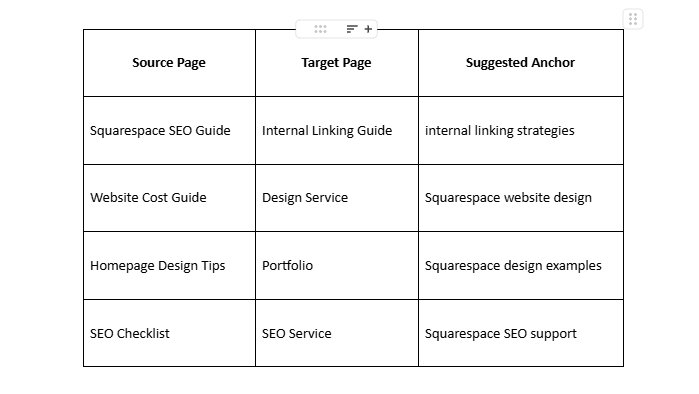
The goal is not to create hundreds of links.
The goal is to create useful connections.
Build a Clear Internal Link Structure
Your internal link structure should make your website feel organized rather than scattered.
Visitors should be able to understand where they are, what information is related, and where they should go next.
Search engines benefit from that same clarity.
Keep Important Pages Close to Main Navigation Paths
Important pages should not require a long journey to reach.
A visitor should usually be able to reach core services without clicking through five unrelated articles first.
Your homepage and main navigation can introduce your top-level website structure.
Contextual internal links can then create deeper relationships between specific pages.
Think of your site as having levels.
Level 1: Core pages
Homepage
Services
Work
About
Contact
Level 2: Main service pages
Squarespace website design
Website redesign
Support or maintenance
Level 3: Supporting resources
Blog posts
FAQs
Case studies
Guides
This hierarchy helps keep the website understandable.
Use Contextual Links, Not Only Navigation Links
Navigation menus are useful, but they should not carry your entire internal linking strategy.
Links placed directly within useful content provide stronger context.
Consider these two examples.
Generic navigation link:
Services
Contextual link:
Read more about our Squarespace website design services if you need professional support with planning, layout, content structure, and site setup.
The second version explains why someone might click.
It also connects the subject of the current page with the destination.
Find and Fix Orphan Pages
An orphan page has no meaningful internal links pointing toward it.
These pages are easy to create when websites grow.
You might publish an article, share it on social media, and then never connect it to another page.
Six months later, the post still exists but sits outside your main content network.
Review your website regularly and identify useful pages that receive no internal links.
Then ask:
Which existing article relates to this page?
Should a service page link here?
Does it belong within a content cluster?
Should it appear within a resource section?
Is the page still useful?
If the answer to the last question is no, improving or removing the page may be better than creating artificial links.
Internal Linking Best Practices for Squarespace
The strongest internal linking best practices focus on relevance first.
Adding more links does not automatically create better SEO.
A useful link has a clear reason to exist.
Use Descriptive Anchor Text
Anchor text is the clickable text used for a link.
Compare these examples.
Weak:
Click here
Learn more
Read this
More information
Better:
Squarespace SEO checklist
Website redesign services
Internal linking best practices
Website conversion tips
Descriptive anchor text tells visitors what they will find after clicking.
It also gives search engines additional context.
However, avoid forcing the same keyword into every link.
If 20 pages all link to one page using identical keyword-heavy anchor text, the pattern may feel unnatural.
Use natural variations.
For a page targeting internal linking strategies, possible anchor text variations might include:
internal linking strategies
internal linking guide
improve your internal links
building internal links
internal link structure
internal linking for SEO
Variation keeps your linking readable.
Link Only When There Is a Real Relationship
A link should help answer the reader's next question.
Suppose an article explains Squarespace typography.
Linking to a detailed guide about choosing website fonts makes sense.
Linking to an unrelated article about email marketing merely because you want to push traffic does not.
Ask:
Would someone reading this sentence reasonably benefit from visiting that page?
If yes, the link probably has value.
Place Important Links Where Readers Will See Them
Links hidden near the bottom of a very long page may receive less attention than contextual links placed where readers naturally need more information.
You do not need to force every important link into the first paragraph.
Instead, add links where they support the conversation.
For example, when discussing website structure, link to your website planning service.
When discussing SEO, link to your SEO service.
When mentioning previous client results, link to a relevant case study.
The placement should feel natural.
Avoid Excessive Internal Links
More links can eventually become noise.
A paragraph containing five different links makes reading harder.
It also leaves visitors unsure which action matters.
There is no universal number that every page must follow.
A 500-word service page and a 4,000-word educational guide have different needs.
Focus on usefulness.
A detailed guide may contain many internal links because it covers multiple related subjects. A short landing page may need only a few carefully chosen links.
Do Not Link Every Keyword Mention
Suppose the phrase "Squarespace SEO" appears 12 times on one page.
You do not need to link every occurrence to your Squarespace SEO service.
One strong contextual link is usually more useful than repeated links that all lead to the same destination.
Repeated linking can make content look distracting and sales-heavy.
Update Older Content With New Links
This is one of the easiest forms of internal link building.
When you publish a new page, do not only add links from that new page toward older content.
Go back to relevant older pages and link them toward your new resource.
Suppose Pocketknife publishes a new guide called:
Internal Linking Strategies for Squarespace
Older articles about Squarespace SEO, blogging, content planning, or site structure could be updated with links pointing toward it.
This gives the new page immediate connections with established content.
It also keeps older articles useful.
Link From Strong Relevant Pages
Some pages naturally attract more traffic, backlinks, or visibility than others.
Look for established pages that closely relate to a page you want to support.
Then add an internal link where appropriate.
Relevance still matters more than simply choosing a popular page.
A high-traffic article about logo design is not automatically the right place to link to a technical Squarespace SEO page.
Find the overlap between page strength and subject relevance.
Use Links to Support Commercial Intent
Informational content should educate first.
That does not mean you must hide your services.
A person reading a detailed Squarespace guide may eventually need professional support.
The commercial transition can be simple.
For example:
If managing page structure, SEO, and design is becoming difficult, working with an experienced Squarespace website designer can help you create a site with a clearer path from search traffic to enquiry.
That feels more useful than inserting a sales pitch halfway through an unrelated paragraph.
How to Add Internal Links on a Squarespace Website
Squarespace makes basic internal linking straightforward.
Within page or blog content, select the relevant words you want visitors to click and use the editor's link option to connect them with another page on your site.
You can also create internal pathways through buttons, navigation, related content sections, and calls to action.
The technical step is simple.
Choosing the right destination is where strategy becomes important.
Add Links Inside Blog Content
Blog posts offer some of the best opportunities for internal linking.
A useful article may naturally mention several related subjects.
Link those subjects to deeper resources rather than trying to explain everything on one page.
For example, an article about Squarespace homepage design might link toward:
Homepage copywriting tips
Navigation guidance
Mobile website design
Conversion-focused design services
This helps create connected topic groups.
Add Links From Service Pages to Supporting Resources
Internal links should not move only from blogs toward services.
Commercial pages can also link toward useful educational content.
A Squarespace SEO service page could include links to guides about:
Technical SEO basics
Internal links
Metadata
Blogging
Image optimization
Search-friendly site structure
These resources can answer questions that prospects have before contacting you.
Connect Related Blog Posts
Avoid leaving visitors at a dead end after they finish an article.
Provide relevant next steps.
You might include a short related-reading section or natural links within your final paragraphs.
Keep the recommendations specific.
"Related articles" is only useful if the articles genuinely relate to what someone has just read.
Use Buttons Carefully
Buttons attract attention.
Use them for actions that deserve stronger visual emphasis, such as:
View our work
Explore Squarespace design services
Request a project consultation
Read the case study
Do not replace every normal text link with a button.
Text links work well for contextual exploration. Buttons work better for important actions.
Build Topic Clusters With Internal Links
Topic clusters provide a practical way to organize growing Squarespace websites.
A cluster contains one broad main page supported by several more specific pages.
For example:
Main Topic: Squarespace Website Design
Supporting content might include:
Squarespace homepage design tips
How to choose a Squarespace template
Squarespace mobile design
Squarespace navigation tips
Website redesign checklist
Squarespace SEO guide
Internal linking strategies
Squarespace blog design
Each supporting page can link toward the main topic page.
Related supporting articles can also connect.
This structure helps avoid random blogging.
Instead of publishing unrelated posts simply because they seem interesting, you create content that supports clear subject areas.
Build Clusters Around Business Services
Your service list can guide content planning.
If Pocketknife provides Squarespace design, SEO, and website support, each service can have its own group of supporting resources.
For example:
Squarespace Design Cluster
Website planning
Template selection
Typography
Page layouts
Mobile design
Navigation
Squarespace SEO Cluster
Keyword research
Page titles
Blog optimization
Image optimization
Internal linking
Content structure
Website Redesign Cluster
Redesign checklist
Signs your website needs updating
Website migration
Content cleanup
Conversion problems
Mobile usability
This creates a stronger connection between informational content and commercial pages.
Use Internal Linking to Support Customer Journeys
SEO traffic has little value if visitors cannot find a meaningful next step.
An internal link strategy should consider user intent as well as keywords.
Visitors usually arrive at different stages.
Early Research Visitors
These people may be searching for questions such as:
What is internal linking?
Does Squarespace work for SEO?
How should a website be structured?
Give them educational resources.
Avoid pushing for an immediate sale in every paragraph.
Comparison Visitors
These visitors may be evaluating solutions.
They might search:
Squarespace designer vs DIY
Should I hire a Squarespace designer?
How much does Squarespace design cost?
Link them toward:
Service pages
Portfolio examples
Case studies
Pricing information
Process pages
Ready-to-Buy Visitors
These people want help.
Make important conversion paths easy to find.
Useful links may lead toward:
Contact forms
Consultation pages
Service packages
Project enquiry pages
Your internal links can move people from education toward action without making the site feel overly promotional.
Common Internal Linking Mistakes
Even well-designed websites can develop poor linking habits.
Watch for these problems.
Linking to Irrelevant Pages
Do not add a link only because a page needs more internal links.
Relevance comes first.
Using Vague Anchor Text Everywhere
"Click here" gives very little context.
Use descriptive wording when possible.
Ignoring Old Blog Posts
Older content can become one of your best linking resources.
Review it when publishing new pages.
Creating Orphan Pages
Every useful page should have a logical connection with other parts of your site.
Sending Too Many Links to Low-Value Pages
Focus your internal link building strategy on pages that support users, rankings, or business goals.
Linking Only to the Homepage
Your homepage already receives attention from navigation and brand links.
Deep pages often need more contextual support.
Link directly to the page that answers the reader's question.
Adding Links Without Reviewing the Destination
Old URLs may be redirected, outdated, duplicated, or removed.
Review internal links during regular site maintenance.
How to Audit Internal Links on a Squarespace Site
You do not need to rebuild your entire website to improve internal linking.
Start with an audit.
1. List Your Important Pages
Identify:
Main services
Top blog posts
Key landing pages
Case studies
Conversion pages
2. Review Their Incoming Internal Links
Ask how many useful pages link toward each important destination.
A major service page with almost no contextual internal links deserves attention.
3. Check Outgoing Links
Review what each page links toward.
Are the destinations genuinely useful?
Are you sending users toward outdated content?
4. Find Orphan Content
Look for articles and pages that are rarely connected with the rest of the website.
Decide whether they should be updated, linked, merged, or removed.
5. Review Anchor Text
Check whether your anchors clearly describe their destinations.
Look for excessive use of:
Click here
Learn more
Read more
This page
Replace vague anchors when a more specific phrase improves clarity.
6. Check Broken Links
Broken internal links create poor user experiences.
They may appear after:
URL changes
Page deletions
Website redesigns
Content migrations
Fix or redirect them.
7. Check Topic Relationships
A technically working link can still be strategically weak.
Review whether your content groups actually connect.
Your strongest articles about Squarespace SEO should not sit separately from your Squarespace SEO service.
How Often Should You Review Internal Links?
Internal linking should not be a one-time project.
Your site changes whenever you publish content, remove a page, rename a service, or change your marketing priorities.
A regular review keeps your structure useful.
For smaller sites, review internal links after major content updates and periodically as your blog grows.
For larger sites, create a repeatable process.
When publishing a new article:
Add links from the article to relevant existing pages.
Find two or more older pages that could link to the new article.
Check whether the article supports a service or main topic page.
Add a useful next step for readers.
Review anchor text before publishing.
This simple habit can prevent many internal linking problems.
How to Measure Whether Your Internal Linking Strategy Works
Internal linking improvements should support measurable goals.
SEO changes rarely happen because of one factor alone, so avoid treating every ranking increase as proof that one new link worked.
Instead, watch broader patterns.
Organic Traffic
Review whether important pages begin attracting more search visitors after receiving stronger internal support.
Search Visibility
Track whether pages gain impressions or improve rankings for relevant searches.
Page Discovery
Check whether new content is being discovered and indexed as expected.
Engagement
Look at how visitors move between pages.
Useful internal links may increase:
Pages viewed per visit
Visits to service pages
Case study views
Contact page visits
Conversions
For commercial sites, this matters most.
Your internal linking strategies should eventually help people find the pages that move them toward becoming customers.
Measure:
Form submissions
Consultation requests
Service page visits
Pricing page visits
Other meaningful actions
SEO traffic alone does not pay the bills.
The structure needs to support the business behind the website.
When Should You Hire a Designer?
Some website owners can handle internal links themselves.
If you manage a small Squarespace site with ten or twenty pages, creating a basic structure may not be difficult.
Professional support becomes more useful when your website has:
Dozens of blog posts
Multiple services
Confusing navigation
Overlapping content
Weak organic traffic
Poor conversion paths
Old pages with no clear purpose
A planned redesign
SEO problems across several sections
A skilled Squarespace website designer should think beyond page appearance.
Design, content hierarchy, navigation, search visibility, and conversion paths all interact.
A beautiful website with weak information architecture can still frustrate users.
Pocketknife can help businesses review how Squarespace pages connect, where visitors lose direction, which pages deserve greater visibility, and how content can support both search intent and commercial goals.
The aim is not to place links everywhere.
It is to create a website where each important page has a purpose and a clear relationship with the pages around it.
A Practical Internal Linking Strategy for Existing Squarespace Sites
If your site already contains dozens of pages, start with a focused approach rather than changing everything at once.
Phase 1: Fix Important Commercial Pages
Choose your main service and conversion pages.
Add relevant internal links toward them from existing blog posts and supporting pages.
Phase 2: Strengthen Content Clusters
Group articles by subject.
Connect articles that answer related questions.
Make sure each group supports a main service or cornerstone resource where appropriate.
Phase 3: Repair Weak Pages
Find orphan pages, outdated articles, broken links, and pages buried deep within your site.
Decide which content still deserves attention.
Phase 4: Improve Anchor Text
Replace unclear anchors with natural descriptive phrases.
Avoid repeating the same keyword unnecessarily.
Phase 5: Create a Publishing Routine
For every new page, decide:
Which pages should it link to?
Which older pages should link back?
Which topic cluster does it belong to?
Which business page does it support?
What should the reader do next?
This turns internal link building from occasional maintenance into part of your normal content workflow.
Internal Linking Checklist for Squarespace
Use this checklist when reviewing your site.
Identify priority service and conversion pages.
Group related content by topic.
Add contextual links between genuinely related pages.
Link supporting articles toward main topic pages.
Update older posts when publishing new content.
Use descriptive anchor text.
Avoid excessive exact-match anchor repetition.
Make important pages easy to reach.
Find and fix orphan pages.
Repair broken internal links.
Remove links that no longer help users.
Connect informational content with relevant commercial pages.
Give readers a clear next step.
Review internal links during content updates.
Track traffic, engagement, rankings, and conversions.
What Is the Best Internal Linking Strategy?
The best internal linking strategy is not the one with the highest number of links.
It is the one that creates the clearest relationships.
Your important pages should receive support from relevant content. Your articles should guide readers toward deeper information. Your commercial pages should be easy to reach without dominating every educational article.
Most importantly, every link should have a reason to exist.
That approach produces a cleaner website for both search engines and human visitors.
Final Thoughts on Internal Linking Strategies for Squarespace
Strong internal linking strategies turn separate Squarespace pages into a connected website.
They help search engines understand your subjects, highlight important pages, discover content, and recognize relationships between services and supporting articles.
They also make life easier for visitors.
Readers can move from one useful answer to another without returning to your menu every few seconds. Someone who begins with a simple SEO question can find a detailed guide, review your services, see examples of your work, and contact you when they are ready.
That is where internal linking and SEO meet good website planning.
Start with your most valuable pages. Build clear topic groups. Use descriptive anchors. Update older content. Remove weak links. Give every important page a logical place within your internal link structure.
If your Squarespace site has grown messy, pages feel disconnected, or your content receives traffic without generating enough enquiries, Pocketknife can help review the structure behind the design.
A better website does not always require more pages.
Sometimes, the pages you already have simply need better connections.
