
Homepage Design Tips for Squarespace Websites
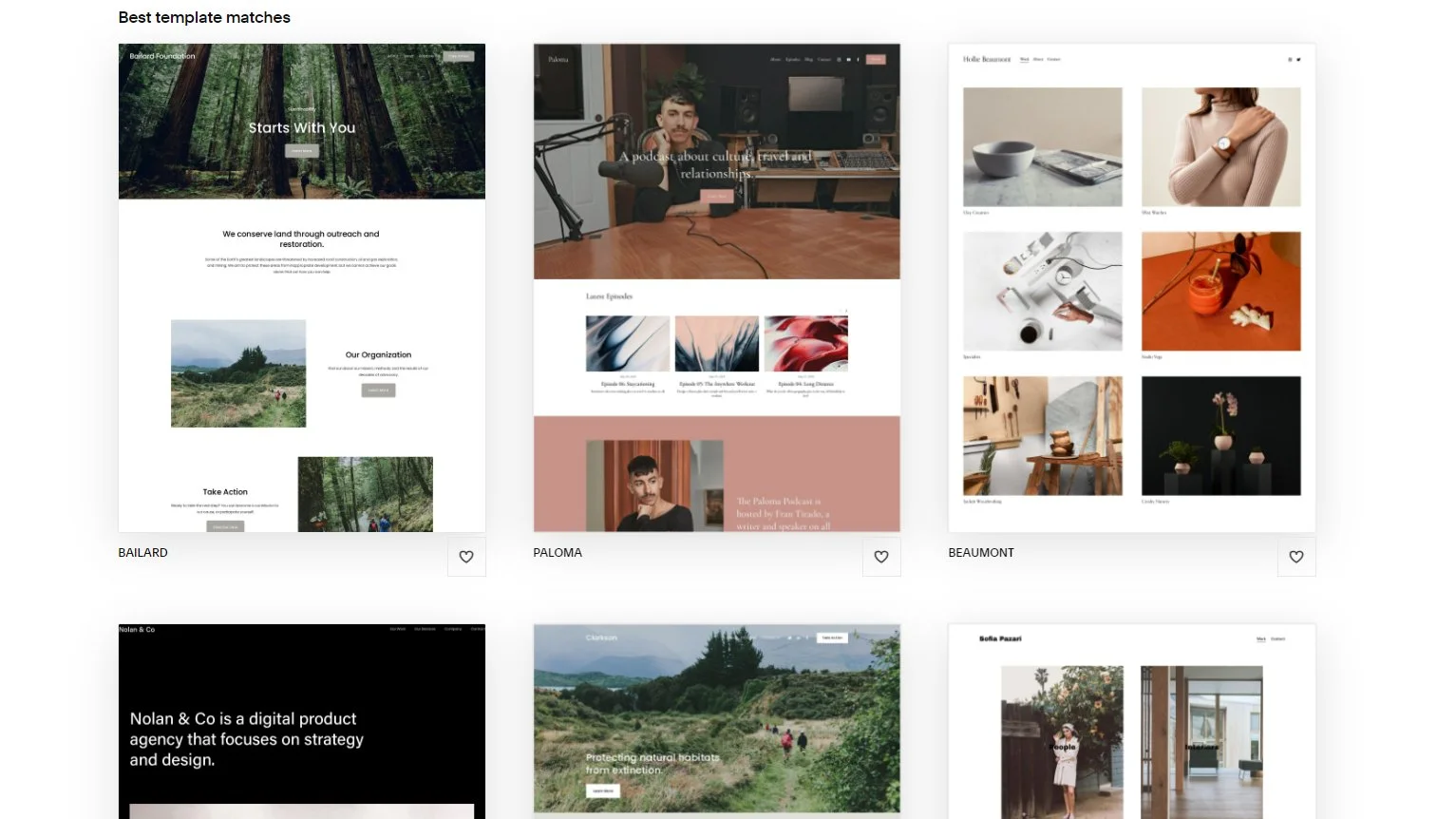
Creating a homepage for your website can be a daunting task. Your homepage serves as the digital storefront of your website, making it the most visited page and the place where visitors make crucial decisions about whether or not to stay. Whether you're designing a Squarespace website for a personal project, a blog, an online store, or a business, getting your homepage design right is crucial. It not only serves as the first impression but also plays a key role in driving user engagement and conversions.
Squarespace is a highly flexible platform that allows users to create beautiful, responsive websites without needing to know how to code. While the platform offers an array of templates and design options, achieving the best results requires attention to detail and an understanding of what makes an effective homepage. This guide will cover in-depth homepage design tips on your Squarespace website to improve both user experience and aesthetic appeal. Whether you're a business owner, a content creator, or a Squarespace website designer, this article will help you create an impressive homepage.
Why a Well-Designed Homepage Matters
Before diving into the specifics of design, it's important to understand why a great homepage is vital. It's not just about looking good; a homepage can be a tool for conversion, engagement, and setting the tone for your entire website. When done right, it keeps your audience engaged, makes them want to explore more, and convinces them to take actions such as signing up for a newsletter, purchasing a product, or reading more content.
Your homepage sets the foundation for the rest of your website. The design, layout, and flow of the homepage directly affect your website’s usability, appeal, and conversion rate. In a highly competitive digital space, having a homepage that clearly communicates your value proposition while maintaining ease of use is a must.
Why Choose Squarespace for Your Homepage Design?
Squarespace is one of the leading website-building platforms, known for its sleek, customizable templates and user-friendly drag-and-drop interface. It offers features like responsive designs, intuitive content management, and built-in analytics, which make it an excellent choice for both beginners and experienced web designers.
However, even with its ease of use, there are several aspects to consider when designing a homepage. Squarespace provides tools that can help you create a professional-looking homepage, but the key lies in how you structure and personalize those elements to suit your brand, style, and goals.
Homepage Design Tips for Squarespace Websites
1. Focus on User Experience (UX) First
User experience is a key aspect of a successful homepage design. If visitors find your homepage difficult to navigate, they won’t stick around for long. Clear navigation, accessibility, and ease of use are essential to creating an enjoyable user experience.
Key UX Considerations for Your Squarespace Homepage:
Navigation Menu: Your navigation should be simple, intuitive, and easy to locate. A clean menu with clearly labeled sections helps users quickly find what they’re looking for. It’s ideal to have your main menu items visible without the need for clicking or scrolling. Make sure that your contact information, important pages, and product categories are easily accessible.
Above-the-Fold Content: Ensure that the most important content appears above the fold (the area visible without scrolling). Visitors should immediately understand what your website is about without needing to scroll down. This content might include your value proposition, main products or services, and a clear call-to-action (CTA).
Call-to-Action (CTA): CTAs are vital for guiding visitors toward the next step in their journey. Place CTA buttons such as "Shop Now," "Get Started," or "Contact Us" in prominent positions throughout your homepage. Make these buttons stand out visually by using contrasting colors that align with your brand identity.
Mobile Optimization: With an increasing number of users browsing from mobile devices, ensuring your homepage looks and functions well on mobile is essential. Squarespace templates are inherently responsive, but always preview how your homepage appears on mobile. Keep in mind that mobile users may have different priorities, so streamline your homepage for small screens.
2. Visual Appeal: Choose the Right Images and Videos
Images and videos are powerful tools for capturing attention, telling a story, and conveying emotions. High-quality, relevant visuals can enhance the overall appeal of your homepage, making it more inviting and engaging.
Visual Homepage Design Tips for Your Squarespace Website:
Hero Image/Video: A large, impactful image or video placed at the top of your homepage can instantly draw attention. This is known as the "hero" section. Choose a high-quality image or video that conveys the essence of your brand or product. Make sure it’s relevant to the message you want to communicate. If using video, ensure it doesn’t distract from the main content or slow down page load times.
Consistent Branding: The images, colors, and typography used on your homepage should reflect your brand’s identity. Consistency is key to building trust and creating a memorable experience. Choose images that complement your color palette and align with the tone of your content. Avoid using generic stock images unless they enhance the overall message.
Image Optimization: Images can significantly slow down your website if not optimized properly. Squarespace allows you to upload high-quality images, but you should still compress them to ensure they load quickly. Tools like TinyPNG can help you reduce file sizes without losing image quality.
3. Craft a Strong, Clear Headline
Your headline is the first piece of text visitors will encounter on your homepage. A well-crafted headline can quickly communicate your website’s purpose, making it easier for visitors to understand what you offer and why they should stay.
Homepage Design Tips for Writing a Strong Headline:
Concise and Clear: Keep your headline short and to the point. Use language that is easy to understand, and avoid jargon or overly complex terms. The goal is for visitors to immediately grasp the core of your message.
Reflect Your Value Proposition: Your headline should clearly communicate the value you offer. If you run an online store, your headline might highlight the unique products you offer. If you're a consultant, focus on how your services can solve problems for clients.
Use Engaging Language: Use active and direct language to create a sense of urgency or excitement. For instance, "Start Your Dream Project Today" is more compelling than just "Dream Project."
4. Maintain a Balance Between Aesthetic Appeal and Functionality
While the design of your homepage is crucial, it’s equally important to ensure it functions well. A visually stunning homepage won’t be effective if it’s difficult to navigate or use.
Key Elements for an Effective Homepage:
Whitespace: Don’t overcrowd your homepage with too many elements. Whitespace (empty space) helps make your design more breathable and allows the important content to stand out. It’s also crucial for improving readability and preventing user fatigue.
Typography: Choose fonts that are easy to read and align with your brand's personality. Avoid decorative fonts that are hard to read, particularly for large blocks of text. Stick to a couple of complementary fonts, one for headings and one for body text.
Hierarchy: Structure the content on your homepage in a clear, logical hierarchy. Use headings, subheadings, and bullet points to break up large chunks of text. This not only improves readability but also guides visitors through the page naturally.
5. Use Social Proof to Build Trust
Social proof is a psychological principle that suggests people are more likely to take action if they see that others have already done so. By showcasing testimonials, customer reviews, or user-generated content, you can build trust and encourage visitors to engage with your website.
How to Incorporate Social Proof:
Customer Testimonials: Adding reviews or testimonials from satisfied customers is a great way to establish credibility and trust. Make sure to feature authentic feedback, possibly with photos or videos, to add a personal touch.
Case Studies: If you offer services, consider adding case studies or success stories from clients. These can provide concrete evidence of the value you provide.
Social Media Integration: Displaying feeds from your social media accounts or showcasing your number of followers can further build social proof. Squarespace offers simple integration with platforms like Instagram and Twitter.
6. Optimize Your Homepage for SEO
Even the most beautifully designed homepage won’t perform well if it’s not optimized for search engines. Squarespace provides several built-in SEO features to help improve your homepage’s visibility on search engines like Google.
SEO Homepage Design Tips for Your Squarespace Homepage:
Incorporate Keywords: Use relevant keywords such as “Homepage Design Tips” and “website design homepage tips” naturally throughout your content. Avoid keyword stuffing, but make sure to mention key phrases in your headline, subheadings, and body text.
Alt Text for Images: Every image you upload should have descriptive alt text. This helps with both SEO and accessibility for users who may rely on screen readers.
Optimize Meta Descriptions: Meta descriptions are the short blurbs that appear under your website’s title in search engine results. Keep them concise (under 160 characters) and include important keywords related to your homepage.
URL Structure: Keep your homepage URL clean and simple. If possible, include your main keyword in the URL to improve search engine rankings.
7. Test and Iterate
Once your homepage is live, it’s important to continuously test and optimize it. User behavior changes over time, and as your audience grows, your homepage may need adjustments to better meet their needs.
Methods for Testing Your Homepage:
A/B Testing: Use A/B testing to compare two different versions of your homepage and see which one performs better. You can test elements such as headlines, images, CTAs, and layout.
Heatmaps: Tools like Hotjar or Crazy Egg allow you to track where visitors are clicking and how they’re interacting with your homepage. Use this data to identify areas of improvement.
Analytics: Squarespace offers built-in analytics that provide insights into how visitors are engaging with your homepage. Track metrics like bounce rate, average time on page, and conversion rates to make informed decisions.
FAQs
1. What Are the Key Elements of a Well-Designed Squarespace Homepage?
A well-designed Squarespace homepage typically includes clear navigation, a strong headline, compelling visuals, and easy-to-find call-to-action (CTA) buttons. The layout should be clean and minimalistic, with well-chosen images and videos that align with your brand’s identity. Key sections include a hero image or video at the top, an about section, product or service highlights, and testimonials or social proof. Additionally, the homepage must be mobile-friendly, with all content accessible across devices. Squarespace’s templates offer flexibility, but it’s crucial to optimize your homepage for user experience and SEO to ensure it performs well.
2. How Do I Optimize My Squarespace Homepage for SEO?
To optimize your Squarespace homepage for SEO, start by using relevant keywords throughout your content. Focus on natural integration in headings, body text, and meta descriptions. Use descriptive alt text for images, which helps search engines understand their content. Ensure that your homepage’s URL is clean and includes key terms. Additionally, make use of Squarespace’s built-in SEO tools to improve your site's metadata. It's also important to focus on fast load times by optimizing images and minimizing unnecessary scripts. Lastly, ensure your homepage is mobile-friendly, as search engines prioritize mobile-optimized websites in rankings.
3. How Can I Improve User Engagement on My Homepage?
Improving user engagement on your homepage requires a strategic mix of design and content. First, ensure your homepage loads quickly to avoid losing visitors due to slow load times. Use a strong and clear headline that communicates your value proposition upfront. Make your CTAs prominent, ensuring visitors know what action to take next. Engaging visuals, such as a hero image or video, can grab attention and provide more context about your brand. Additionally, add social proof like customer testimonials, reviews, or social media feeds to build trust. Finally, keep your homepage layout clean, intuitive, and mobile-optimized.
4. What Is the Importance of a Mobile-Responsive Homepage on Squarespace?
A mobile-responsive homepage is crucial in today’s digital landscape, as more users access websites from smartphones and tablets. Squarespace templates are inherently mobile-responsive, but it's essential to test your homepage on various devices to ensure a smooth experience. Mobile responsiveness ensures that your website looks great on smaller screens, with easy navigation and clickable buttons. Google also prioritizes mobile-optimized sites in its search rankings, making mobile optimization not only a user experience concern but also an SEO one. Ensure that images scale correctly, content is readable without zooming, and your CTAs are easily clickable on mobile devices.
5. How Can I Add Social Proof to My Squarespace Homepage?
Social proof can significantly increase trust and credibility on your Squarespace homepage. To add social proof, start by featuring customer testimonials or reviews. These can be displayed in a dedicated section or integrated throughout the page. You can also add badges for certifications, industry awards, or partnerships to demonstrate credibility. If your brand is active on social media, display live social media feeds (such as Instagram or Twitter) to show real-time engagement with your audience. Another effective tactic is to showcase user-generated content, such as photos or videos from happy customers, as it provides authentic proof of your brand’s value.
Conclusion
Your homepage is arguably the most important page of your Squarespace website. It’s the first thing visitors see, and it plays a crucial role in their decision to stay and engage with your content. By following these homepage design tips, you can create a homepage that not only looks great but also performs well by encouraging user engagement and conversions.
Whether you’re just starting out with Squarespace or looking to fine-tune an existing design, these homepage design tips will help you make the most of your homepage. If you need assistance or a custom homepage design, feel free to reach out to us at Pocketknife, where our expert Squarespace website designers are ready to help you build the perfect homepage for your needs.
