
How to Ensure Consistency in Website Design Across All Pages
A website can have great colors, beautiful images, and well-written content, yet still feel poorly designed. Often, the problem is not one bad page. It is the lack of consistency between pages.
When buttons look different from one section to another, headings change size without a clear reason, spacing feels random, or every page seems to follow its own design rules, visitors notice. They may not know exactly what feels wrong, but the website can become harder to understand and navigate.
Consistency in website design helps solve this problem. It gives every page a shared visual language while still allowing individual pages to serve different purposes.
For businesses using Squarespace, this is especially important. Squarespace makes it relatively easy to build and edit pages, but having access to many design options does not mean every option should be used everywhere. A strong website needs rules for typography, colors, spacing, buttons, images, navigation, and content structure.
This guide explains how to create consistency in design, why it matters for user experience, common mistakes to avoid, and how a Squarespace designer can help maintain a unified look across an entire website.
What Is Consistency in Website Design?
Consistency in website design means using the same visual and functional patterns throughout a website.
This includes elements such as:
Typography
Colors
Buttons
Navigation
Page layouts
Spacing
Image styles
Icons
Forms
Headings
Links
Calls to action
Content formatting
Mobile layouts
Consistency does not mean every page has to look the same. Instead, each page should feel like part of the same website.
For example, your homepage may use a large hero section, while your services page may use a more structured layout. Both pages can still use the same heading styles, button treatments, fonts, color palette, spacing rules, and navigation.
That shared structure creates familiarity.
Consistency in Design vs. Repetition
Consistency and repetition are different.
Repetition means using the same element again and again.
Consistency means using elements according to clear rules.
For example, placing the same large image block on every page may be repetitive. But using the same image proportions, spacing, and visual treatment across different image sections creates consistency.
A good website should have enough repetition to feel familiar without becoming boring.
Why Consistency in Website Design Matters
Visitors do not want to relearn how a website works every time they move to a new page.
If the navigation stays in the same place, buttons look familiar, headings follow predictable patterns, and layouts behave in expected ways, users can focus on the information instead of figuring out the interface.
This is one reason consistency in UI design is so important.
1. It Makes Websites Easier to Navigate
Navigation should feel predictable.
If your main navigation appears at the top of the website, visitors generally expect it to remain there. If one page uses a different navigation structure without a clear reason, users may have to stop and figure out where they are going next.
Consistent navigation helps visitors answer basic questions quickly:
Where am I?
What pages are available?
How do I return to the homepage?
Where can I find the service I need?
How do I contact the business?
2. It Builds Familiarity
Users learn patterns as they browse.
If every call-to-action button follows the same design, visitors quickly understand what those buttons do. If every page uses consistent heading styles, visitors can scan content more easily.
This is a core part of consistency in user interface design.
3. It Creates a More Professional Appearance
A website with different fonts, button styles, colors, and spacing on every page can appear unfinished.
Consistent design communicates that the website was planned rather than assembled page by page.
This matters particularly for businesses where the website is a major part of the brand experience.
4. It Supports Better User Experience
Good UX is not only about attractive design.
Visitors need to understand how the website works. Consistent layouts and interface patterns reduce unnecessary decisions and make common actions easier to recognize.
A user should not have to wonder whether a colored piece of text is a link on one page but plain text on another.
5. It Strengthens Brand Recognition
Your website is one of your brand's main customer touchpoints.
Colors, typography, imagery, layout, and tone all contribute to how people recognize the business.
When these elements remain consistent, the website becomes more closely connected to the brand.
The Main Elements That Need Design Consistency
A consistent website starts with a defined set of design rules.
You do not need to control every tiny detail. You do need to decide which elements should remain consistent across pages.
1. Typography
Typography is one of the first things visitors notice.
Your website should have a clear hierarchy for:
H1 headings
H2 headings
H3 headings
H4 headings
Body text
Captions
Navigation text
Buttons
Links
For example, your H1 might use a large display font, while H2 and H3 headings use a simpler variation of the same typeface.
The exact font choices depend on the brand, but the hierarchy should remain predictable.
Create Clear Typography Rules
Define:
Font family
Font size
Font weight
Line height
Letter spacing
Text color
Maximum text width
This prevents every page from developing its own typography system.
Avoid Too Many Fonts
Using multiple fonts can make a website feel disconnected.
For most business websites, a small type system is enough. One primary typeface with one complementary typeface can often cover headings, body text, navigation, and calls to action.
The goal is not to use as many fonts as possible. The goal is to create a clear hierarchy.
2. Color Palette
Your color palette should also remain consistent.
A website might have:
Primary brand color
Secondary brand color
Accent color
Background color
Text color
Muted text color
Border color
These colors should have defined purposes.
For example:
Primary color: Main buttons and important brand elements
Accent color: Highlights and secondary actions
Neutral colors: Backgrounds, text, borders, and supporting sections
Using a different shade of blue on every page may seem minor, but small inconsistencies can make the design feel disconnected.
Use Color With Purpose
Do not assign colors randomly.
A visitor should be able to recognize patterns.
If your primary CTA is dark blue with white text, maintain that treatment across the site unless there is a specific design reason to change it.
3. Buttons and Calls to Action
Buttons are a major part of website interaction.
A business might have calls to action such as:
Contact Us
Book a Consultation
Get Started
View Services
Learn More
Request a Quote
The wording can change depending on the context, but the visual treatment should generally remain consistent.
Define Button Styles
Your button system can include:
Primary button
Secondary button
Text link
Hover state
Active state
Disabled state, where applicable
For example, a primary button might always have a filled background, while a secondary button uses an outline.
When visitors encounter these patterns repeatedly, they learn what different actions mean.
4. Spacing and Alignment
Spacing is often overlooked when discussing consistency in design principles.
Yet inconsistent spacing can make a website look messy even when everything else is correct.
Think about:
Space above headings
Space below headings
Paragraph spacing
Section padding
Button spacing
Image spacing
Column gaps
Mobile spacing
If one page has large gaps between sections while another is tightly packed, the website may feel like it was created by different designers.
Create a Spacing System
Instead of choosing random spacing values, establish a small set of spacing levels.
For example:
Small
Medium
Large
Extra large
You can then use those values repeatedly.
This makes it easier to build new pages without starting from scratch.
5. Navigation
Navigation is one of the strongest examples of consistency in website design.
The primary navigation should generally remain in the same location throughout the site.
Your navigation should also maintain:
Same font
Same spacing
Same colors
Same hover behavior
Same dropdown behavior
Same mobile structure
There can be exceptions. A campaign landing page, for example, may intentionally use a simplified navigation structure.
But those exceptions should be deliberate.
6. Images and Photography
Images also need a consistent visual approach.
This does not mean every photo needs to look identical.
Instead, establish guidelines around:
Image proportions
Cropping
Image quality
Subject matter
Background treatment
Border radius
Overlay effects
Placement
For example, if every image on your website has rounded corners except one random image in the middle of a service page, that difference can feel accidental.
Keep Image Quality Consistent
Poor-quality images can stand out even more when surrounded by professionally selected photography.
Compress images for performance, but avoid excessive compression that makes them blurry.
How to Build a Consistent Website Design System
A design system gives your website a set of rules that can be followed across pages.
It does not need to be a complicated document.
A simple design system can include:
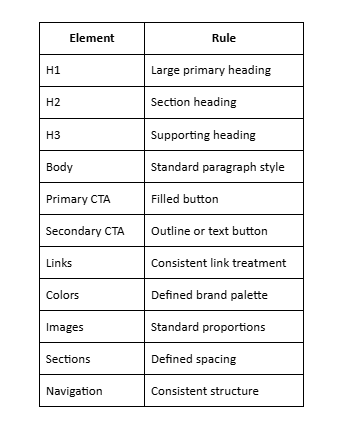
This becomes a reference point when designing new pages.
Start With Global Styles
For a Squarespace website, global design settings can help maintain consistency.
Rather than manually changing every heading and button, establish the primary styles first.
This is particularly useful when a website has many pages.
Why Global Styles Matter
Imagine changing your brand font after creating 25 pages.
If the typography is controlled globally, you can update the main style and apply the change across the website more efficiently.
Without a clear system, redesign work can involve checking page after page for inconsistent elements.
How to Ensure Consistency Across Different Page Types
Not every page has the same purpose.
A homepage, service page, blog article, contact page, and landing page may all have different structures.
The solution is not to make them identical.
Instead, identify which elements should remain consistent and which can change.
Homepage
The homepage may include:
Hero section
Introduction
Services
About section
Featured work
Testimonials
CTA
Footer
The homepage can be visually distinctive while still using the same typography, colors, buttons, navigation, and spacing rules as the rest of the website.
Service Pages
Service pages should usually share a common structure.
For example:
Service Page Structure
H1: Service name
Introduction: Short explanation
Benefits: Key advantages
Details: More information
Supporting visuals: Images or graphics
CTA: Next step
Using a repeatable structure makes it easier for visitors to compare services.
Blog Pages
Blog posts may have a different layout, but their core elements should remain familiar.
Maintain consistency across:
Blog title
Author information
Publication date
Featured image
Body typography
H2 and H3 headings
Links
Related posts
CTA
Footer
Contact Page
A contact page can be simpler than other pages.
However, its form fields, buttons, typography, and navigation should still follow the site's established design system.
Consistency in UI Design: What Users Actually Notice
Consistency in UI design goes beyond visual appearance.
It also concerns how interface elements behave.
If one button opens a new page and another similar-looking button triggers a different action, users can become confused.
Keep Interaction Patterns Consistent
Consider:
Button behavior
Dropdown menus
Form fields
Error messages
Hover effects
Accordion sections
Navigation menus
Search functions
Pop-ups
Similar actions should generally behave in similar ways.
This is a key part of consistency in user interface design.
Use Familiar Patterns
For example, if clicking a plus icon expands additional information in one accordion, users should not have to learn a completely different interaction on another page.
The same applies to:
Menu icons
Search icons
Close buttons
Form controls
Sliders
Tabs
Familiar patterns reduce confusion.
A Simple Consistency in Design Example
Consider a five-page business website.
The homepage uses:
Dark blue buttons
48px H1 headings
18px body text
Rounded image corners
Large section spacing
The service page uses:
Green buttons
64px H1 headings
16px body text
Square image corners
Very small section spacing
The contact page uses:
Orange buttons
A different font
Centered navigation
Different form styling
Nothing is necessarily wrong with any individual choice.
The problem is that the website lacks a shared design language.
A better approach would be to keep the core design rules consistent:
Same primary typefaces
Same button system
Same color roles
Same navigation
Same basic spacing system
Same image treatment
Same heading hierarchy
The individual page layouts can still differ.
That is a practical consistency in design example: different pages serving different purposes while still clearly belonging to the same website.
Common Website Design Consistency Problems
Even well-designed websites can develop inconsistencies over time.
Here are some of the most common issues.
1. Designing Each Page From Scratch
Starting every page with a blank canvas may seem creative, but it often produces inconsistent results.
One page gets generous spacing. Another becomes crowded.
One page uses a large heading. Another uses a much smaller heading.
Better Approach
Create reusable sections and page patterns.
Start with established components and modify them only when the content requires a different structure.
2. Adding New Fonts Without a Plan
A redesign may introduce a new font while older pages continue using the original typography.
This creates a website where different sections feel like separate brands.
Before adding a font, ask:
Does it fit the existing brand?
Does it improve readability?
Does it work across headings and body text?
Does it work well on mobile?
Is it actually necessary?
3. Using Too Many Button Styles
A website does not need ten different button designs.
Too many styles make it difficult for users to understand which actions matter.
Keep the button system simple.
4. Ignoring Mobile Consistency
A website can look consistent on desktop and completely different on mobile.
This happens when designers focus on desktop layouts without checking:
Font sizes
Section spacing
Button widths
Image cropping
Navigation
Columns
Text alignment
Consistency must extend across screen sizes.
How to Maintain Consistency on Squarespace
Squarespace provides tools that can make website-wide design management easier, but good results still depend on planning.
Use Site-Wide Design Settings
Start by establishing your primary:
Fonts
Colors
Buttons
Spacing
Headings
Background styles
This creates a foundation for future pages.
Build Reusable Sections
If the same type of content appears across several pages, create a repeatable design pattern.
For example, a service introduction might consistently include:
Heading → Short paragraph → Image → CTA
The content can change while the structure remains familiar.
Be Careful With Custom CSS
Custom CSS can be useful when the standard Squarespace controls do not provide the exact design behavior you need.
However, CSS should support your design system rather than create dozens of exceptions.
Before adding custom code, determine whether the change needs to apply:
Site-wide
To a page type
To a section
To a single element
This can prevent future maintenance problems.
How Consistent Design Affects Website Maintenance
Consistency is not only a visual issue.
It can make future website updates easier.
Suppose you have established a standard service-page structure.
When you add another service, you already know:
Where the heading goes
How the introduction is formatted
Which image style to use
How the CTA should look
How much spacing is appropriate
You spend less time deciding basic design questions.
This becomes particularly valuable as a website grows.
Consistency and Website SEO
Design consistency is not a direct ranking factor in the same way that relevant content, crawlability, or other technical SEO considerations can be.
However, design decisions can affect the experience people have with your website.
A consistent structure can make content easier to scan and navigate.
Keep Heading Hierarchy Clear
Each page should have a logical heading structure.
Use:
H1 for the main page topic
H2 for major sections
H3 for subsections
H4 when further organization is needed
Do not select heading levels simply because a particular size looks attractive.
Keep Internal Links Consistent
If users can move naturally between related pages, they can find more information without repeatedly returning to the main navigation.
For example:
Service page → Related service → Case study → Contact page
This creates a clearer journey through the site.
Consistency vs. Creativity: Do You Have to Choose?
No.
A consistent website can still have a strong visual personality.
The key is knowing where to experiment.
You can introduce creativity through:
Photography
Illustrations
Animations
Unique layouts
Large typography
Editorial-style sections
Custom graphics
Interactive elements
But the core rules should remain recognizable.
A creative page should still feel like it belongs to the same website.
Use Exceptions Intentionally
Breaking a design rule can be effective when there is a clear reason.
For example, a portfolio page may use a different image grid because the work itself requires it.
A campaign landing page may remove standard navigation to focus attention on one action.
These are intentional exceptions.
The problem is not breaking a rule.
The problem is breaking rules without knowing they exist.
A Practical Website Design Consistency Checklist
Before launching a new page, review it against your existing design system.
Typography
Does the page use the approved fonts?
Are heading levels used correctly?
Is body text consistent?
Are line lengths comfortable?
Does typography work on mobile?
Colors
Are approved brand colors being used?
Are CTA colors consistent?
Are text and background colors readable?
Are accent colors being used for a clear purpose?
Buttons
Do primary buttons look consistent?
Are secondary buttons styled consistently?
Are hover states similar?
Do buttons clearly communicate their purpose?
Layout
Does section spacing follow the site's established system?
Are content widths consistent?
Are elements properly aligned?
Do similar sections use similar structures?
Navigation
Is the main navigation consistent?
Does the mobile menu behave as expected?
Are dropdowns and links predictable?
Images
Are images high quality?
Do image proportions match the established style?
Are crops intentional?
Are image treatments consistent?
Mobile
Does the page work well on smaller screens?
Are headings appropriately sized?
Are buttons easy to tap?
Is spacing comfortable?
Are images displayed correctly?
When Should You Consider Professional Design?
Not every website needs professional Squarespace website design help.
If your website has five simple pages and you are comfortable working in Squarespace, you may be able to maintain it yourself.
Professional assistance becomes more useful when:
The website has many pages
The brand has complex visual requirements
Multiple people edit the website
Existing pages have inconsistent styles
You are planning a redesign
Custom CSS is involved
The website needs stronger UX
Mobile layouts require significant work
You want a custom Squarespace web design rather than a standard template
You are unsure why the website feels visually inconsistent
A designer can help establish the rules before individual pages are built.
That distinction matters.
Fixing inconsistencies after dozens of pages have been created can take considerably more time than establishing a design system at the beginning.
What Affects Design Cost?
When researching Squarespace website design cost, it is easy to focus only on the initial build.
The actual cost can depend on the scope of the project.
Factors may include:
Number of Pages
A five-page brochure website requires less design work than a 30-page website with multiple page types.
Custom Design
Using an existing Squarespace structure may require less design work than creating a highly customized experience.
Content Preparation
If copy, photography, graphics, and other assets are already prepared, the project may require less production time.
Custom CSS
Custom CSS can add design flexibility, but it may also require additional development and testing.
Responsive Design
Desktop and mobile layouts both need attention.
A design that looks good on a large monitor may need substantial adjustments for phones and tablets.
SEO and Technical Setup
Some projects also include:
SEO setup
Metadata
URL structure
Redirects
Analytics
Search Console
Image optimization
Performance improvements
These requirements can affect the overall project scope.
Ongoing Updates
A website is rarely finished forever.
Businesses add services, publish articles, change messaging, update portfolios, and make branding adjustments.
A clear design system makes these updates easier to manage.
How Pocketknife Approaches Consistency in Design
For businesses working with Squarespace, Pocketknife focuses on creating websites where design decisions work together rather than treating every page as a separate project.
The process can begin with the overall visual direction and then move into the details that visitors interact with every day.
That includes:
Typography
Colors
Page structure
Navigation
Calls to action
Responsive layouts
Content hierarchy
Visual spacing
Squarespace functionality
Custom design requirements
The goal is not to make every page identical.
Instead, each page should have a clear purpose while still feeling connected to the rest of the site.
Start With the Website as a Whole
One of the easiest ways to create inconsistencies is to design the homepage first and think about the rest of the website later.
A better process considers the full site structure.
Before building individual pages, determine:
What pages are required?
Which pages share a similar purpose?
Which sections will be reused?
What should the primary CTA look like?
How should headings work?
Which design elements should remain fixed?
Where can individual pages have more creative freedom?
These decisions create a stronger foundation for the build.
Design for Future Pages
A good Squarespace website should not only work on launch day.
Consider what happens when the business adds:
A new service
A new team member
A new portfolio project
A new blog category
A new landing page
New promotional content
If every new page requires a completely new design approach, maintaining the website becomes harder.
A defined design system gives future pages a starting point.
How to Audit Your Website for Consistency
You do not need a complicated process to identify inconsistencies.
Open each important page and compare them side by side.
Start with the homepage, then review:
About page
Services pages
Portfolio or work pages
Blog
Contact page
Landing pages
Look specifically for differences in typography, buttons, spacing, colors, navigation, and images.
Create a Simple Audit Sheet
You can create columns for:
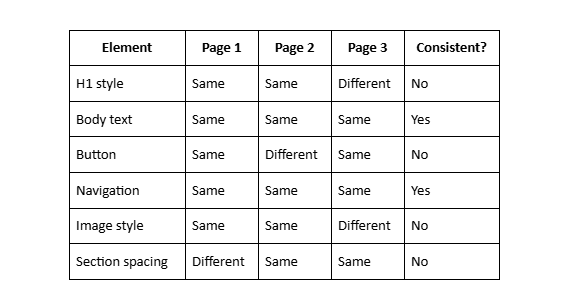
This quickly shows where the biggest inconsistencies exist.
Fix Systemic Problems First
If every page has inconsistent H2 styling, fix the global heading style first.
Do not manually repair 20 pages one at a time if the underlying issue can be addressed through your site's design settings.
Frequently Asked Questions
1. What is consistency in website design?
Consistency in website design means using the same visual and functional patterns throughout a website. This includes typography, colors, buttons, navigation, spacing, imagery, page layouts, and interactive elements. A consistent website helps visitors understand how the site works and creates a more organized experience across different pages.
2. Why is consistency in website design important?
Consistency helps visitors navigate a website more easily and understand what different elements do. When buttons, headings, menus, and other interface elements follow familiar patterns, users spend less time figuring out how the website works. Consistent design can also support brand recognition and make a website appear more professional.
3. What is consistency in UI design?
Consistency in UI design means keeping visual elements and interactions predictable throughout a user interface. Similar buttons should look and behave similarly, navigation should follow familiar patterns, and forms, menus, icons, and other controls should use consistent styles. This helps users interact with a website without having to learn new patterns on every page.
4. How can I make my website design more consistent?
Start by establishing clear rules for typography, colors, buttons, spacing, navigation, images, and page layouts. Use global styles where possible and create reusable sections for content that appears across multiple pages. Regularly reviewing pages side by side can also help identify inconsistencies.
5. Should every page on a website look the same?
No. Different pages can have different layouts based on their purpose. A homepage, service page, blog post, and contact page may need different structures. However, they should share important design elements such as typography, colors, navigation, buttons, and overall visual style.
Final Thoughts
A strong website does not need every page to look identical.
It needs every page to feel intentional.
That is the real purpose of consistency in website design.
Typography should follow a clear hierarchy. Colors should have defined roles. Buttons should behave predictably. Navigation should remain familiar. Spacing should follow a system. Images should share a visual direction. Mobile layouts should follow the same overall design language.
These details may seem small when considered individually, but together they shape how visitors experience a website.
For Squarespace websites, establishing these rules early can also make future updates easier. Instead of making design decisions from scratch every time a new page is added, you have a clear framework to follow.
